Most point of sale systems live in their own world. They track sales, but the data has to be exported, synced, or manually reconciled with your inventory and accounting systems at the end of the day. Ask the Ledger's POS module eliminates that disconnect entirely. Every sale updates inventory in real time, applies the correct customer pricing automatically, and flows into the same AR, reporting, and management workflows as your wholesale and distribution operations.
This makes Ask the Ledger equally useful for retail stores, bakery storefronts, distributor counter sales, farmers market booths, trade show events, and any business that sells products directly to walk-in customers while also managing wholesale accounts, delivery routes, or recurring billing.
How the POS works
The POS screen opens full-width on any Windows PC or tablet. Products appear as touch-friendly tiles with names and prices, organized by category. Staff tap to add items to the current sale, scan barcodes with a USB scanner, or type item codes directly. The right panel shows the running order with quantities, prices, and a live total. Payment is processed with one tap: Cash (F8), Check, or Card (F9).
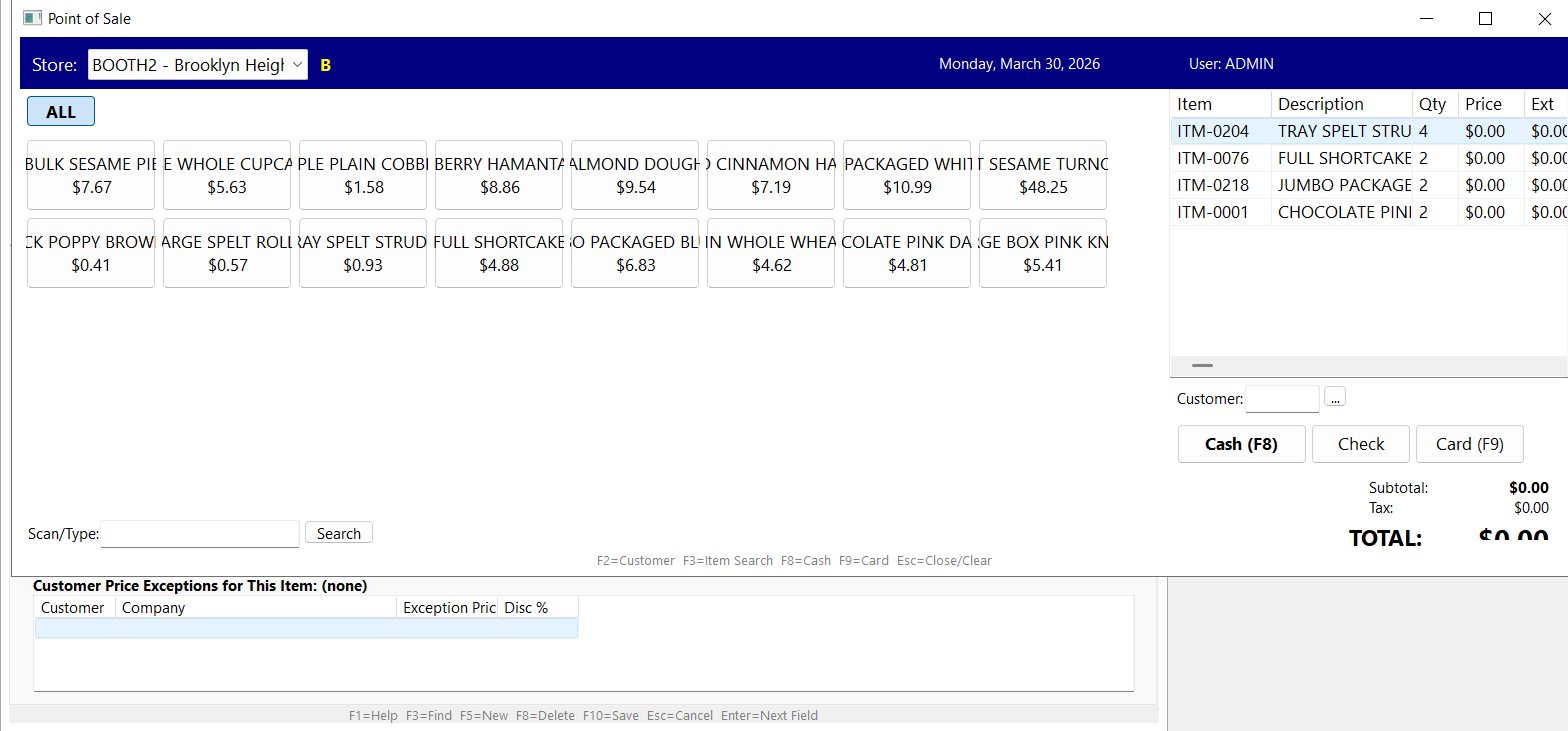
Point of Sale with product tiles and booth mode
Multi-location support
Each POS terminal is assigned to a store location. You can run separate locations — a main store, a satellite shop, a warehouse counter — and track sales, inventory, and performance independently per location. Inventory transfers between locations are handled within the same system, so stock levels are always accurate across every site.
Multi-location does not mean multi-license. All locations are managed from one system with one plan. There are no per-terminal or per-location surcharges.
Booth mode for events
Booth mode is designed for temporary selling locations: farmers markets, trade shows, pop-up shops, food festivals, and seasonal events. Create a booth location, assign it a product selection (often a subset of your full catalog), and sell at the event. All sales track back to the booth location for per-event profitability analysis. When the event is over, the booth location stays in the system for historical reporting or can be reused for the next event.
This is particularly valuable for bakeries and food producers who sell wholesale during the week and direct-to-consumer at weekend markets. The same inventory, the same pricing engine, the same customer database — just a different selling context.
Customer-specific pricing at the register
When a known customer is selected at the POS (via customer number, name search, or account lookup), the system automatically applies their negotiated pricing, volume discounts, and any active price exceptions. This means wholesale customers who walk into your storefront get their contract pricing without the cashier having to know or look up the rate. Walk-in retail customers get standard pricing. The 5-tier pricing engine handles everything automatically.
Customer price exceptions appear on screen so the cashier can see if a special price is active. This prevents disputes at checkout and makes the sales process faster for both parties.
Barcode scanning
The POS supports standard USB barcode scanners. Scan an item barcode and it appears in the sale immediately with the correct price. For items without barcodes, staff can type the item code or use the product tiles. The Scan/Type field at the bottom of the screen accepts both barcode input and manual entry, so the workflow stays fast regardless of whether products are barcoded.
Store favorites
The product tile grid can be configured per location with the items that sell most frequently at that store. Instead of scrolling through thousands of SKUs, the cashier sees the 20 or 30 products that account for 80 percent of sales at that location. An "ALL" button switches to the full catalog when a customer wants something outside the usual selection. Category filters narrow the view further for stores with larger tile sets.
Real-time inventory integration
Every POS sale immediately decrements on-hand inventory for the selling location. There is no end-of-day sync, no batch upload, no reconciliation step. The same inventory database that tracks wholesale orders, route deliveries, production output, and purchase receipts also reflects POS sales in real time. If the warehouse team ships a large wholesale order that takes stock below the reorder point, the POS station sees the updated availability instantly.
Reporting per location
POS sales feed into the same reporting system as all other transactions. Managers can run reports by store location, by date range, by product category, by salesperson, or by customer. The AI Report Builder works with POS data the same way it works with everything else: ask a question like "What were total sales at the Brooklyn Heights booth last Saturday?" and get an answer in seconds.
No special hardware required
The POS runs on any Windows PC or tablet. It works with any USB barcode scanner and any Windows-compatible receipt printer. There is no proprietary hardware, no iPad requirement, no mobile device dependency. If you have a Windows machine and a scanner, you have a POS station.
Who uses this
- Retail stores that want a POS connected to real inventory and customer management, not a standalone register
- Bakeries with a retail storefront and wholesale distribution — one system for both channels
- Distributor counter sales where walk-in customers buy at the warehouse
- Farmers market and trade show vendors who need portable, temporary POS that still connects to their main system
- Food producers selling both wholesale and direct-to-consumer
- Specialty retail — hardware stores, pet supply shops, cleaning product retailers, and similar businesses with both walk-in and account customers
POS as part of the full system
The POS is one module inside Ask the Ledger, not a separate product. It shares the same customer database, inventory, pricing engine, reporting, and user roles as every other module. This means a business that starts with wholesale distribution and adds a retail storefront does not need to buy, implement, or reconcile a separate POS system. Everything is already connected.
For the full feature set, see Features. For a live walkthrough, request a demo.
See the POS in action
Schedule Your Live DemoExplore more
- Full feature list
- ERP for Bakeries — wholesale + retail in one system
- ERP for Hardware Distributors — counter sales + delivery
- Recurring Billing
- Route Delivery Software
- Best ERP for Distributors in 2026