Runtime 1:30 · Recorded 2026-04-19 · Ask the Ledger EDI module
A 90-second walkthrough of the Ask the Ledger EDI engine: trading partner setup, X12 810 invoice generation from live ERP data, and the AI Mapping Assistant that reads a trading partner's PDF implementation guide and generates a complete field mapping in about 30 seconds.
Runtime 1:30 · Recorded 2026-04-19 · Ask the Ledger EDI module
This is the EDI engine built into Ask the Ledger. It lets wholesale distributors send and receive X12 EDI documents directly from the ERP, with no third-party VAN or middleware.
Trading partner setup is straightforward. Enter the partner code and name, link it to a customer, and configure the ISA and GS identifiers on the Identity tab. The Transmission tab lets you choose SFTP, AS2, or a local folder for testing.
On the Test tab, Generate Test 810 creates a real X12 invoice using your live ERP data. You can see the actual EDI output, verify the segments, and transmit it to the outbound folder. Check Inbound pulls and parses incoming 850 purchase orders automatically.
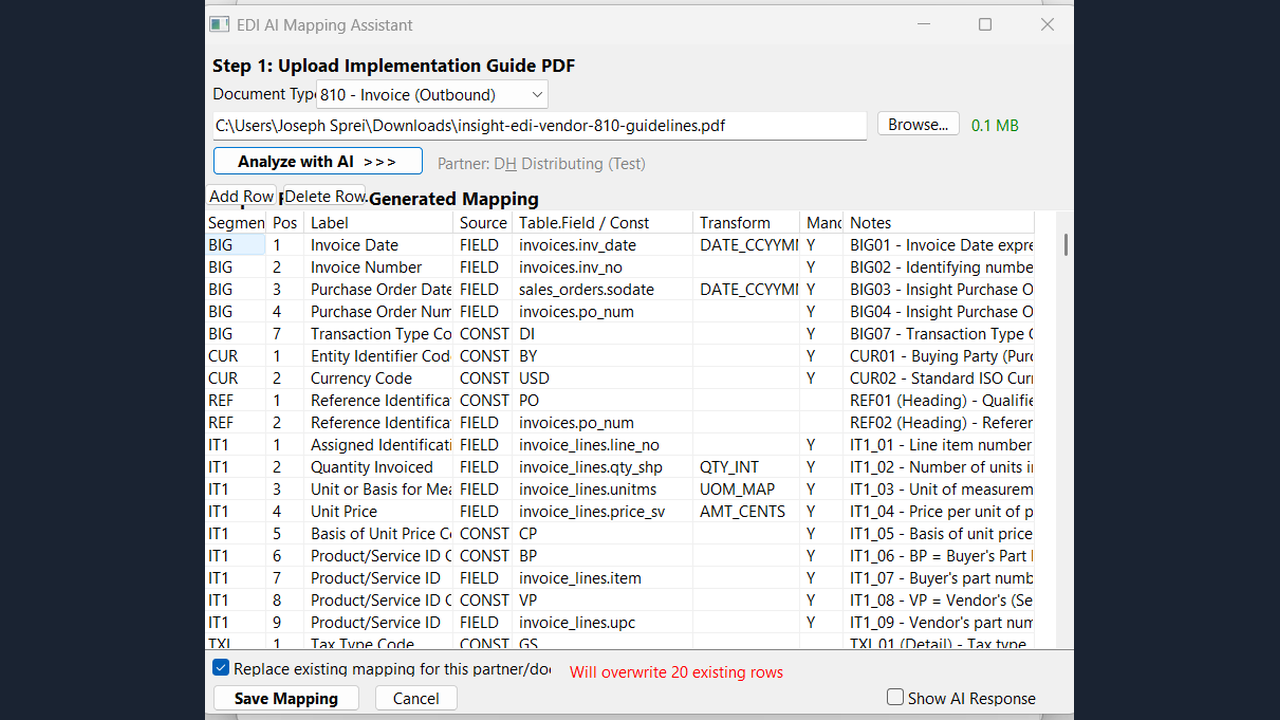
Now the feature that changes everything. The AI Mapping Assistant. Upload your trading partner's implementation guide PDF, select the document type, and click Analyze with AI. Claude reads the specification and generates the complete field mapping in about thirty seconds.
The result is a full mapping grid: segments, positions, labels, source fields, transforms, and mandatory flags. All editable. What normally takes a consultant four to eight hours is done in under a minute.
No VAN subscription. No per-document fees. No middleware. Just your ERP talking directly to your trading partners.
The demo covers the four moving parts of the Ask the Ledger EDI engine: