Most ERP "AI" announcements are roadmap items, marketing decks, or chatbot wrappers that don't touch the actual workflow. Ask the Ledger's AI features ship today and solve specific bottlenecks distributors deal with daily — the buyer who needs a margin report by next Tuesday, the controller who's spent three weeks waiting on an EDI mapping for a new grocery chain, the operations manager training a new warehouse hire who needs to know how recurring billing works at 2pm on a Friday.
The three features below are all production code, all in customer-evaluated builds, and all use the same operating principle: AI removes the bottleneck on the easy 80% of a task so humans can focus on the 20% that needs real judgment.
1. Plain-English Reporting
Type a question. Get the answer.
The historical reporting workflow in any mid-market ERP looks like this: the operations manager wants to know "which customers haven't ordered in the last 60 days but ordered every month before that?" They open a ticket. IT or the report writer takes 2–5 days to schedule it. The report comes back, doesn't quite answer the question, and another iteration follows. By the time the answer is in hand, the moment that prompted the question has passed.
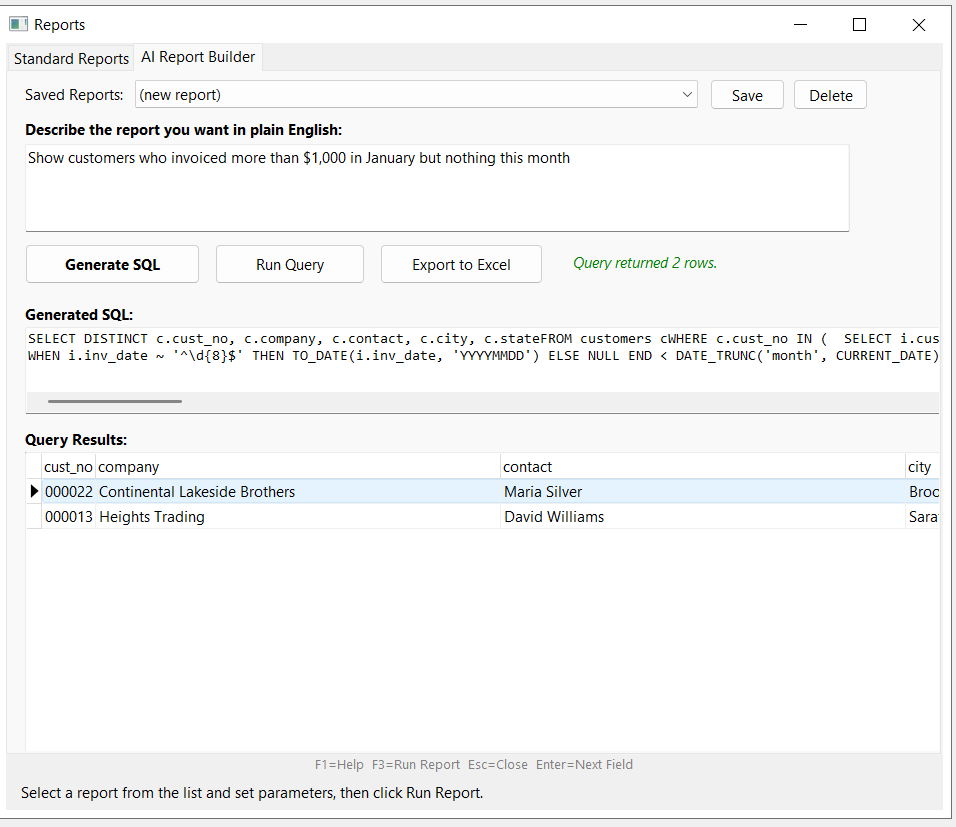
The plain-English reporting feature inverts this. The user types the question into a search box inside the ERP. Behind the scenes, the AI generates the SQL query against the ERP schema, runs it on the local database, and returns results in a grid that exports to Excel. No report writer, no SQL knowledge, no waiting for IT.
Examples of questions distributors actually ask:
- "Show me customers who ordered more than $5,000 last month but nothing this month."
- "List all open orders over 30 days old, sorted by customer."
- "Which 20 SKUs have the highest carrying cost as a percentage of sales?"
- "Compare gross margin by category this quarter vs last quarter."
- "Show every invoice paid in the last 90 days with a discount taken outside terms."
The AI sees the schema, not the data. The SQL it generates runs locally against your database. Results stay on your infrastructure. The AI never sees customer names, order amounts, or financial detail — it sees "find customers where condition X" and produces the query that satisfies it.
For more on how this works in practice, see Plain English Reporting in a Small Business ERP.
2. AI EDI Mapping
Read the implementation guide. Generate the mapping. Cut onboarding from 10 weeks to 2–3.
EDI trading partner onboarding has been a 6–10 week process for as long as EDI has existed. The bottleneck isn't technology; it's a human reading a 50–200 page implementation guide PDF and translating it into a field-by-field mapping by hand. Every retailer's specification is slightly different. Walmart's 850 isn't the same as Stop & Shop's. Target's 856 has different requirements than Whole Foods'. The standard gives you the grammar; the implementation guide gives you the dialect; and someone has to learn the dialect before any electronic documents can flow.
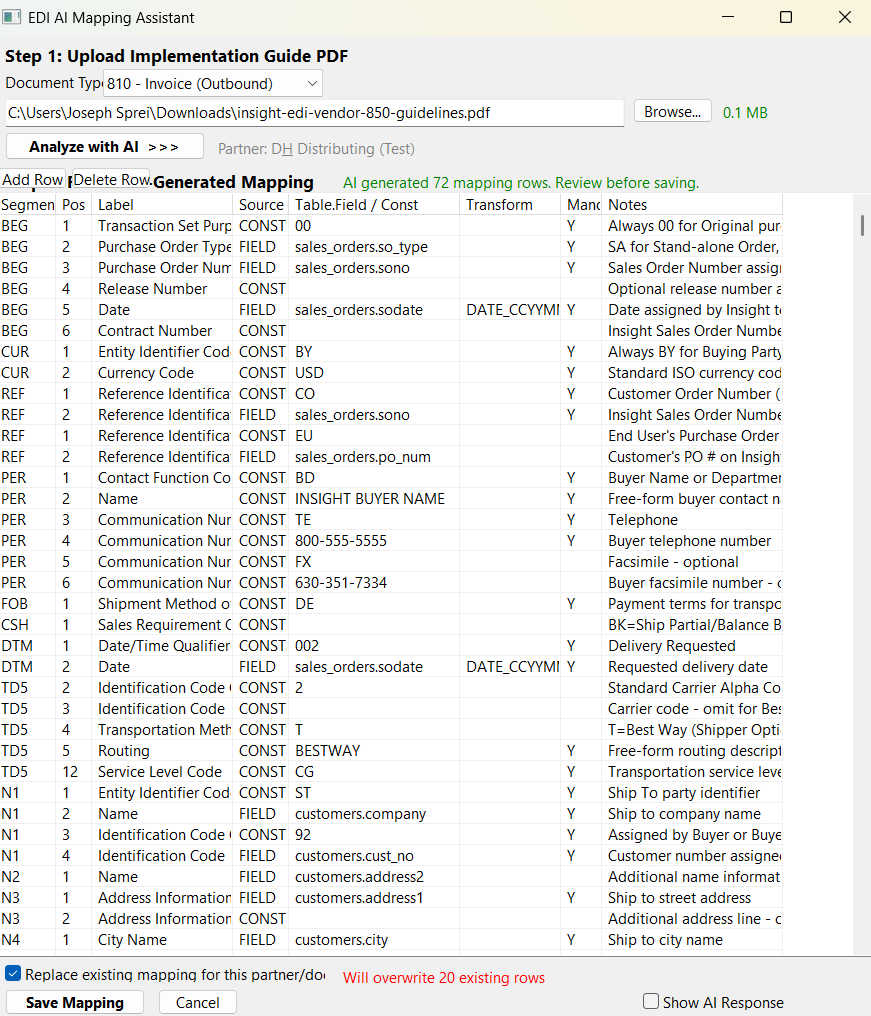
Ask the Ledger's EDI mapping AI reads the trading partner's PDF directly, understands the segment-and-element structure of X12 EDI, and generates a mapping that connects your ERP fields to the trading partner's specification. The output is a structured grid: each row is one EDI field, with the segment, element position, plain-language label, your matching ERP field, and a note flagging anything ambiguous. You review the mapping, adjust where needed, and save.
The first test cycle still happens — trading partners require certification testing regardless of how the mapping was generated. But you arrive at certification with a mapping that's already 80–90% correct, generated in minutes instead of days. The number of error cycles drops. The 6–10 week timeline collapses to 2–3.
Cost implications matter too. Traditional EDI middleware (SPS Commerce, DiCentral, TrueCommerce) charges $500–$2,000 per trading partner setup plus monthly per-connection fees, mostly to cover the manual mapping labor. When the labor is automated, those fees stop making sense. Ask the Ledger includes EDI in the core product instead of as a third-party service bolt-on.
For the full breakdown of where the weeks go in traditional EDI onboarding and what AI specifically replaces, see Why EDI Onboarding Takes 6–10 Weeks — and How AI Changes That.
3. In-App AI Help Center
Ask "how do I…" inside the ERP. Get an answer with citations from the user manual.
Every ERP ships with a 200-page user manual that nobody reads cover to cover. When a warehouse hire on day three needs to know how to handle a partial return against a multi-line invoice, they have three bad options: page through the PDF for 20 minutes, call a more experienced coworker (who is busy), or guess. The new feature replaces all three.
The AI Help Center is a search box inside the ERP. Type a question in plain English. The system loads the user manual, scores each section by relevance to the question, sends the top sections to Claude Haiku, and returns an answer with citations to the specific manual section the answer came from.
Why Haiku and not a more capable model? The task is extractive question-answering over a fixed corpus, not open-ended reasoning or generation. Haiku is fast (typical response in 1–3 seconds), cost-efficient (fractions of a cent per question), and accurate enough for the citation-required answer format the help center enforces. Every answer ends with a "Source:" line pointing to the manual section, so users can verify the AI's interpretation against the authoritative documentation.
Example questions the help center handles:
- "How do I process a partial return against an invoice with multiple line items?"
- "What's the difference between a recurring billing template and a standing order?"
- "How do I set up a new EDI trading partner?"
- "How do I reverse a posted journal entry?"
- "What happens to an open PO when I close a vendor account?"
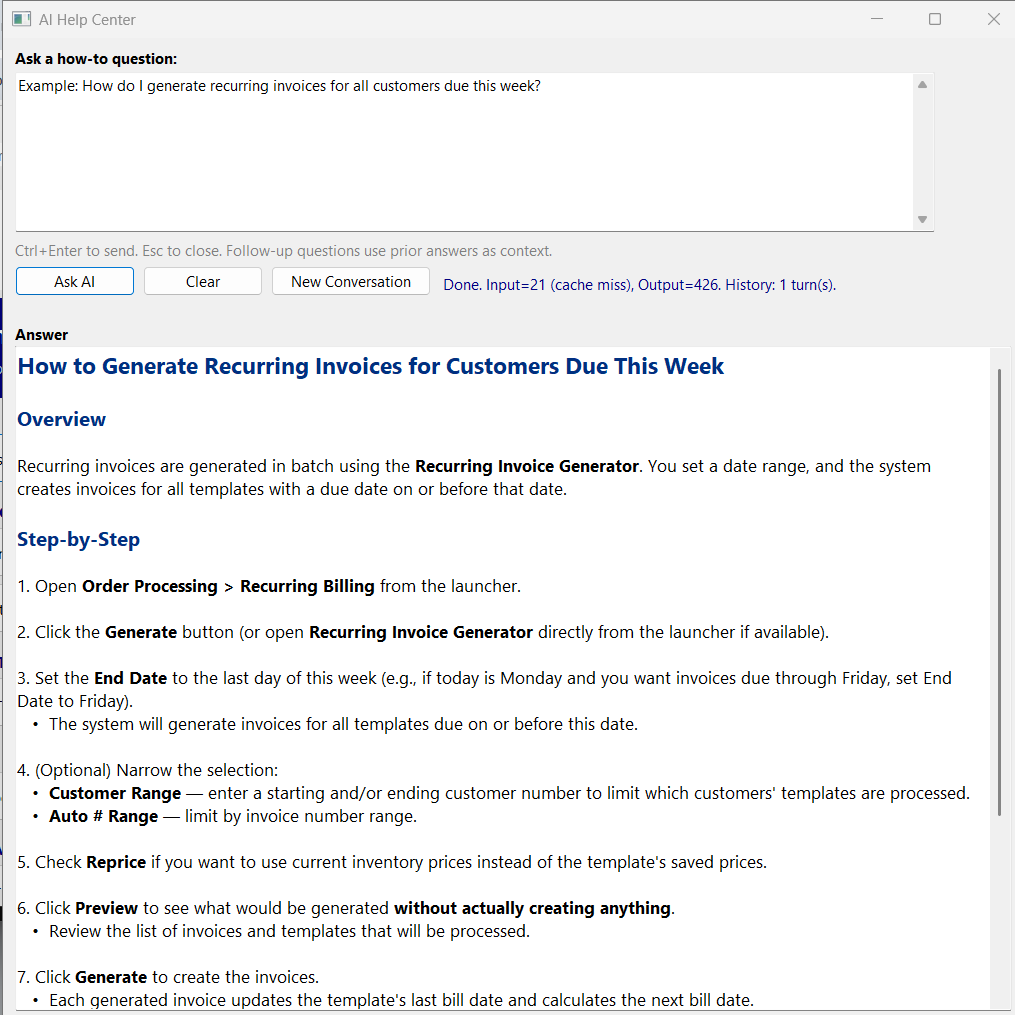
This matters for a specific reason: the biggest objection to ERP migration isn't cost or features — it's the fear of training a team on a new system. When new hires can self-service their how-to questions through an AI that cites the manual, training overhead drops substantially. The ERP becomes more approachable for the people who use it daily, not just the IT team that implemented it.
Why these three, and not 30
"AI" can mean almost anything in 2026. Most ERP vendors announce AI features that are demos, roadmap items, or chatbot wrappers that don't actually touch operational workflow. The three features above were chosen by the same criteria: each addresses a specific bottleneck distributors deal with weekly, each has a clear measurable outcome (report turnaround time, EDI onboarding weeks, help-desk volume), and each can be evaluated by a prospect in a single demo session.
Future AI features will be added by the same standard. If a feature doesn't reduce a real workflow bottleneck or doesn't have a measurable outcome, it doesn't ship.
What this does not replace
Plain-English reporting doesn't replace a real BI tool for executive dashboards or recurring scheduled reports — those still belong in a tool built for that workload. AI EDI mapping doesn't replace the trading partner's certification testing — the human review on both sides still matters. The AI Help Center doesn't replace formal training for complex workflows like a multi-warehouse cutover — it handles day-to-day "how do I" questions.
The pattern across all three is that AI removes friction from the high-frequency, low-stakes part of the job, freeing humans to focus on the lower-frequency, higher-stakes work where judgment matters.
Data privacy and on-premise deployment
The ERP runs on the customer's own Windows server. The database is local. Customer data — orders, customers, invoices, financial detail — doesn't leave the local network as part of normal operation. The AI features are the exception: each makes outbound API calls to Anthropic's Claude API for the specific task it performs.
The minimum data principle: only what's needed for each request leaves the server. Plain-English reporting sends the question and the schema, not the underlying data — the AI generates the query, which runs locally. EDI mapping sends the trading partner's PDF (their public specification) and the relevant ERP field names, not actual transactional data. The help center sends the user's question and matched manual sections, not customer or financial data. Anthropic's API does not use submitted data to train models.
For customers in regulated industries or with strict data residency requirements, the AI features can be disabled at the system level. The rest of the ERP functions normally; users just don't see the AI options.
Related resources
- Plain English Reporting in a Small Business ERP — how the natural-language-to-SQL workflow works in detail
- Why EDI Onboarding Takes 6–10 Weeks — and How AI Changes That — mechanics of the EDI mapping AI
- EDI Integration — product page for the full EDI capability
- Features — full feature list including non-AI capabilities
- On-Premise ERP — deployment model context